Multiple Displays
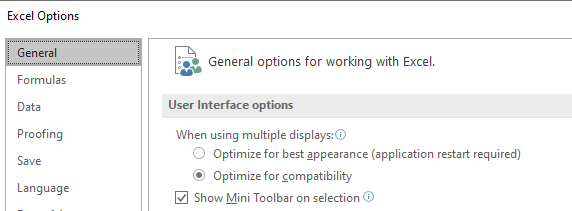
Figure 1 - Excel User Interface Options - Multiple Displays
In more recent versions of Excel, there is an option for controlling how multiple display configurations with different densities (DPI settings) are handled by Excel. This setting can be found in the main Excel Options menu (Figure 1, right).
Please note: In some versions of Excel, there is a shortcut for this setting on the taskbar at the bottom of the Excel window.
While efforts have been made to make @RISK 8 work with the “Optimize for best appearance” mode of operation, @RISK 8.0 will work best with the “Optimize for compatibility” option.