Batch Fit Report Options
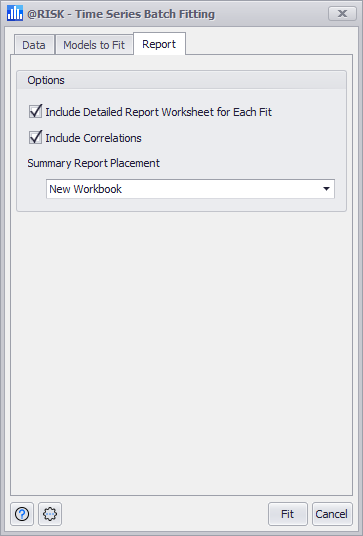
Figure 1 - Batch Fitting Report

The Time Series Batch Fitting window includes a third tab for configuring the output of the fitting process. The Report tab (Figure 1, right) includes all settings for the creation and placement of fitting process results.

Report Options

The reporting options for the batch fitting process are:

  • Include Detailed Report Worksheet for Each Fit - If selected, a detailed report for every time series model tested will be included for each data set.
  • Include Correlations - Include correlation data in the summary data reported for the batch fitting process.
  • Summary Report Placement - Designate where the batch fitting output will be created.
    • Active Workbook - Add all output to a new worksheet (or worksheets if detailed reports are chosen) added to the end of the current workbook.
    • New Workbook - Create a new Excel workbook and add the output.
    • After Last Used Column in Active Sheet - Insert the batch fitting statistics only (including correlations, if selected) after the last column of values in the current worksheet. If detailed reports are selected, new worksheets will be created in the current workbook.
    • Query for Starting Cell - Select the destination cell where the summary report should begin.