Creating Multiple Reports
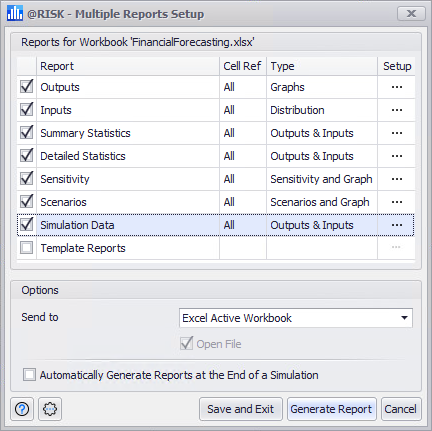
Figure 1 - Multiple Reports Setup Window
Multiple Reports allow many individual reports to be combined together.
The grid at the top of the dialog contains a set of check-boxes that control which individual reports to include. The ellipsis buttons ( ) in the Setup column to the right of each entry brings up the individual option dialogs for that report.
In the Options group the following configurations are available:
Command Buttons
The Multiple Reports Setup window includes a number of command buttons at the bottom of the window:
-
 Help - Open help resources (online or local, based on @RISK settings); see Help Button for more information.
-
 Settings/Actions - Window-specific settings and actions. The Simulation Settings options are:
 -
 Save and Exit - Validates and saves the report settings in the dialog without actually creating a report.
 -
 Generate Report - Runs the report creation process.