Configuring Distributions for Fit
When performing a fit the process can, and in most cases should, be limited to a certain set of distribution functions. The distributions to be included in the process, as well as the method of analyzing how well each distribution fits to the data, are configured in the Distributions tab of the Fit Distributions to Data window (Figure 1, below). There are two versions of the Distributions tab layout, based on the Fitting Method that is chosen; see Fitting Method, below, for more information.
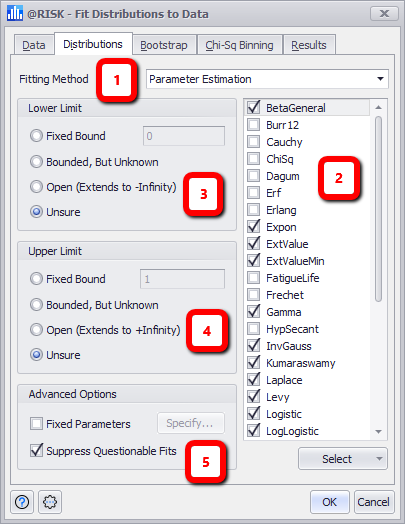
Figure 1 - Fit Distributions to Data - Distributions Tab
Distributions Tab
The primary layout of the Distributions tab consists of the following sections:
- Fitting Method - See below for more information.
- Distribution Selection
- Lower Limit Options
- Upper Limit Options
- Advanced Options
For either Fitting Method chosen (Parameter Estimation or Predefined Distribution), select a distribution to be included in the fitting process by checking the box next to the distribution name.
When using Parameter Estimation, use the Lower Limit and Upper Limit sections to filter the list of distributions that match the required characteristics (e.g. lower or upper bounds).
When using Predefined Distributions, the Name and @RISK distribution function for each predefined distribution will be displayed.
Below the Distribution Selection list is a Select button (Figure 2, below); the options in this menu can be used to select distributions in the list above in groups; please note that using the Select menu to select distributions works in conjunction with the Data Type, Lower Limit, and Upper Limit settings. If any of these settings are changed after using one of these options, the distributions that are filtered out of the list will NOT be included in the fitting process.
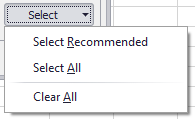
Figure 2 - Select Menu
The options available are:
Fitting Method
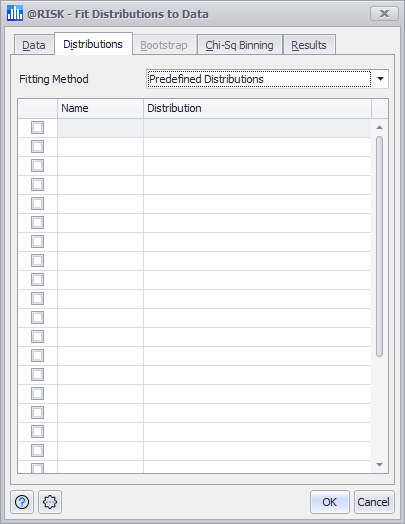
Figure 3 - Fitting Method - Predefined Distributions
The Fitting Method pulldown has two values - 'Parameter Estimation' and 'Predefined Distributions'.
Lower and Upper Limits
The Lower Limit and Upper Limit section are used to filter the list of distrubutions based on the bounding characteristics of the distribution and the options selected.
See Selecting Distributions for more information.
Advanced Options
The Advanced Options section includes two options for further controlling the fitting process:
- Fixed Parameters - For some distributions, certain parameters can be set to a fixed value during the fitting process; this will limit the selected parameters to the values set when the fitting process tests to determine how well a distribution fits to the selected data. For example, the Mean of a normal distribution could be set to '10', which would only allow the fitting process to change the value for Standard Deviation when testing for fit. Fixed Parameter values are applied in addition to boundary limits that have been set in the Lower Limit and/or Upper Limit sections.
-
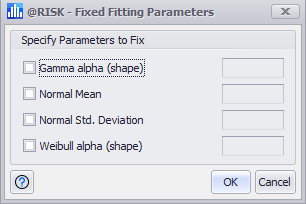
Figure 4 - Fixed Fitting Parameters Window
To set fixed parameters, check the box for 'Fixed Parameters' to open the Fixed Fitting Parameters dialog (Figure 4, right). Within this window, check the distribution parameters that should be fixed, and set the values for every parameter selected.
To edit existing fixed parameters, click the Specify button to open the Fixed Fitting Parameters window and view or edit the existing configuration.
- Suppress Questionable Fits - Selecting this option will exclude distributions from the Fit Results where those distributions can mathematically be fit to the data, but the configuration of the distribution fails various common sense heuristic tests. Although it is often possible to fit a distribution from a mathematic standpoint, it is sometimes questionable from a practical standpoint; these fits will not return results in the Fit Results window.